New Architecture for Agentic AI
Background
Our On-demand Knowledge Task Processing system opened the door for more general Agentic AI for PKM. With that foundation in place, we began to think about the next level of generalization: What if we let users define agents from the prompts themselves?
This thinking led us to envision the future of AI4PKM as an open source framework where agents, prompts, and skills can be easily shared and customized. Combined with a desktop app for better usability and features, this creates a powerful yet accessible platform for personal knowledge management.
User Values
The updated architecture provides several key benefits:
Runtime environment for user-defined knowledge tasks - Users can define their own knowledge tasks through prompts, triggered by file system events or calendar events (coming soon). The system supports multiple CLI agents (Claude, Codex, Gemini), allowing you to choose the best agent for each task.
Minimized hurdles for non-technical users - The Mac app provides a one-click install of all necessary packages along with a UI for PKM configuration and workflow monitoring. This makes the system accessible to users without technical backgrounds.
Voice command for PKM interaction - Through the Mac app, users can interact with their PKM system using voice commands for both knowledge task management and quick-turnaround tasks.
Architecture Components
Orchestrator
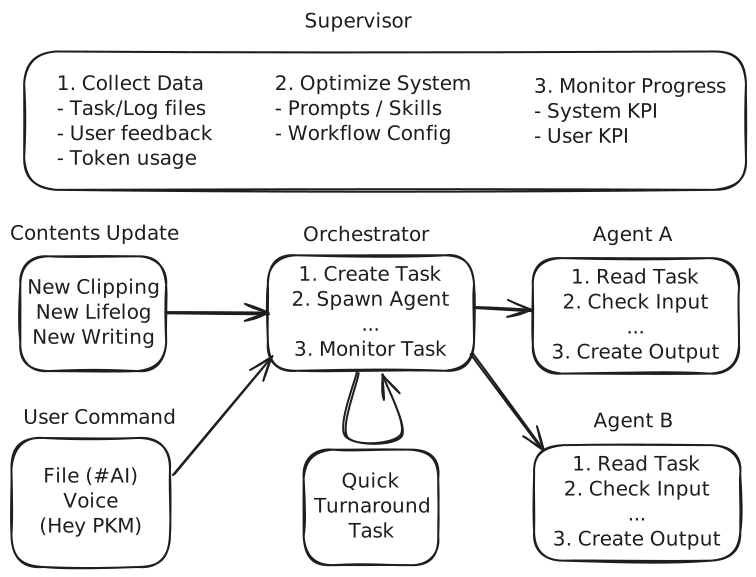
The Orchestrator is the central coordination layer that manages the entire workflow. Its configuration has two main parts:
Agent-level Config - Defines how each agent operates, including input paths and types (new_file or updated_file), output paths and types, and the preferred CLI agent (Claude, Codex, or Gemini) for execution.
System parameters - Controls system-wide settings like concurrency level and optional max token usage limits.
Task
A Task is the unit of work given to an Agent by the Orchestrator. Tasks are managed in Markdown files for transparency and auditability. The task structure is mostly the same as the previous architecture, maintaining consistency with our existing workflows.
Agent
The Agent is the runtime abstraction for each Task, providing a consistent interface across different CLI agents. Agent configuration is stored in the Task file and includes references to prompts (stored in the Prompts folder) and input/output settings (inherited from the Orchestrator config).
PKM Ecosystem
Mac App (new)
The new Mac App provides an easier route for installation and monitoring. It removes technical barriers by handling environment setup automatically and providing a visual interface for workflow management.
Obsidian
Obsidian remains the primary interface for viewing and editing Markdown documents, visualizing content link graphs, and managing the content database (Base) through its viewer/editor.
Code Editor + CLI Agent
For users who prefer more interactive agentic workflows, code editors with CLI agents provide AI-assisted writing with diff review capabilities. This allows for more granular control over the editing process.
FAQ
What prior knowledge is required?
With the Mac App, most technical hurdles are removed. Installing the Mac App also sets up all necessary environments automatically. Setting up Agents becomes as easy as configuring input and output paths in the Mac App interface.
How do I integrate into existing Obsidian vault?
At minimum, the following folders will be needed to set up AI4PKM in your existing vault:
orchestrator:
  prompts_dir: "_Settings_/Prompts"
  tasks_dir: "_Settings_/Tasks"
  logs_dir: "_Settings_/Logs"
New users can still elect to create a demo vault using the Mac App to get started quickly.
For implementation details, see the AI4PKM repository on GitHub.